ICO icon online maker tool introduction
1、favicon.ico
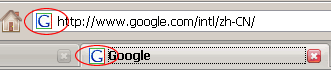
Usually used as a URL's preview thumbnail, as a website logo. favicon.ico appears in the browser's address bar or tab, as shown belowcircled
location. Currently, almost all browsers support ico icons.
2. After successfully generating the favicon.ico file, the browser will automatically prompt to download the ico icon. Click save and place the generated favicon.ico in the root directory (or other directories).
3. Insert between the<head></head>tags in the page source<link rel="shortcut icon" href=" /favicon.ico" />。